Pixraft Developer API, MCP Server and CLI: Run AI Image, Video and Audio Models From Code or Claude
Generate AI images, video and audio, and run multi-step workflows, from your code, your terminal, or Claude and Cursor with the Pixraft API, MCP server and CLI.
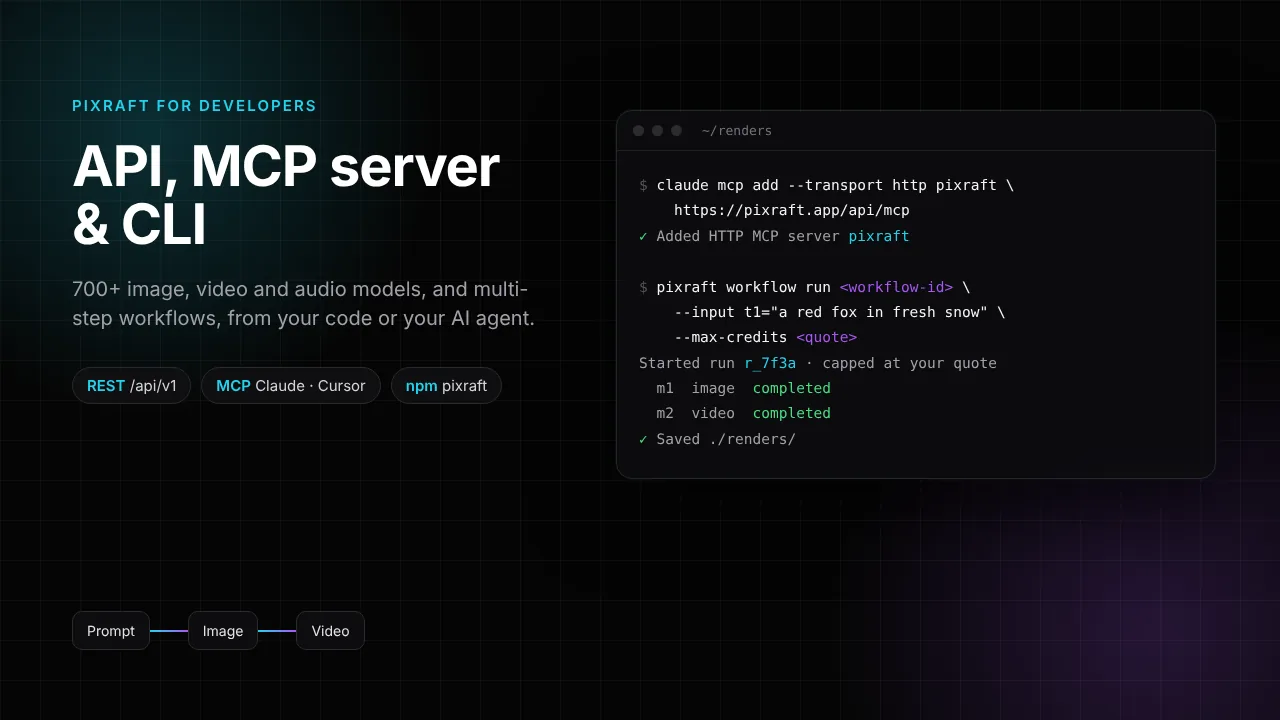
Pixraft now has a Developer API. One API key gives your code, your terminal and your AI agent the same 700+ models as the studios, and the same Workflow Studio pipelines, billed in the same credits at the same prices.
There are three ways in, and you can mix them:
- The REST API at
/api/v1, for apps, scripts and backends. - The MCP server at
pixraft.app/api/mcp, for Claude, Cursor and other AI agents. - The
pixraftcommand-line tool on npm, for your terminal and CI.
The developer docs list every endpoint, tool and command. This post covers what each one is for and how to start.
Which way in should you use?
| Feature | REST API | MCP server | pixraft CLI |
|---|---|---|---|
| Best for | Apps, backends and scripts | Claude, Cursor and other AI agents | Your terminal, shell scripts and CI |
| How you connect | Authorization: Bearer pxr_… | https://pixraft.app/api/mcp with your key, or a connector link | npm install -g pixraft, then pixraft login |
| Images, video and audio | Yes | Yes | Yes, and it downloads the result |
| Workflow Studio pipelines | Yes | Yes | Yes |
| Reference files | Presigned upload | Presigned upload | @./file in any parameter |
| Spend ceiling | maxCredits, required for workflow runs | max_credits, required on paid tools | --max-credits, required |
How do you get an API key?
- Sign in to Pixraft and open Profile → API keys.
- Create a key and copy it. It is shown only once.
- Keep it on a server or in your terminal, never in browser code.
You can have up to 10 keys and revoke any of them at any time. Keys are managed from a signed-in browser session: an API key cannot create or revoke keys.
How do you generate from code with the REST API?
Find a model, check its price, then generate with a ceiling. Quotes are free.
curl "https://pixraft.app/api/v1/models?type=image&q=seedream"
curl -X POST https://pixraft.app/api/v1/quote \
  -H "Authorization: Bearer $PIXRAFT_API_KEY" -H "Content-Type: application/json" \
  -d '{"modelId":"bytedance/seedream-v4.5","params":{"prompt":"a red fox in snow"}}'
curl -X POST https://pixraft.app/api/v1/generations \
  -H "Authorization: Bearer $PIXRAFT_API_KEY" -H "Content-Type: application/json" \
  -d '{"modelId":"bytedance/seedream-v4.5","params":{"prompt":"a red fox in snow"},"maxCredits":15}'
The generation call returns a generationId. Check GET /api/v1/generations/{id} every few seconds until status is completed, failed or moderated. The url it returns is a temporary signed link, so download the file promptly.
Image-to-video, edits and lip sync take a reference file. Pass any public https URL, or upload a local file with POST /api/v1/uploads and use the link it returns. GET /api/v1/generations lists your past generations, newest first.
How do you connect Pixraft to Claude, Cursor or another AI agent?
The MCP server speaks Streamable HTTP at https://pixraft.app/api/mcp and authenticates with your API key.
- Claude Code: run the command below.
- Claude on the web or desktop: add a custom connector in Settings → Connectors and paste the connector link shown when you create a key. The link contains your key, so keep it private.
- Cursor and other clients: add the URL with an
Authorizationheader in their MCP settings.
claude mcp add --transport http pixraft https://pixraft.app/api/mcp \
  --header "Authorization: Bearer pxr_…"
Then ask in plain language: "list Pixraft video models with native audio", "quote a 5 second Kling clip", or "run the prompt → image → video template with a fox in the snow". The server has 17 tools: model lookup and quotes, generation and status, balance and history, reference uploads, and nine workflow tools.
Lookups and quotes are free. The generate and run_workflow tools require max_credits, and the server tells the agent to quote first and confirm the price with you before it spends.
How do you use the pixraft CLI?
npm install -g pixraft
pixraft login
pixraft models --type video --search kling
pixraft quote --model bytedance/seedream-v4.5 --prompt "a red fox in snow"
pixraft generate --model bytedance/seedream-v4.5 --prompt "a red fox in snow" --max-credits 15 --out ./renders
pixraft history --limit 10
pixraft generate waits for the result and downloads it. A --param value of @./file uploads a local file first, for example --param image=@./photo.png on an image-to-video model. The PIXRAFT_API_KEY environment variable overrides the saved key, which is handy in CI. The CLI needs Node.js 20 or newer.
Can you run Workflow Studio pipelines from code?
Yes. Workflows you build in Workflow Studio run from the REST API, the MCP server and the CLI. Five starter templates are ready to copy: prompt → image → video, script → voice → lip sync, product photo → UGC ad, image → upscale, and prompt → music.
pixraft workflow templates
pixraft workflow create --template prompt-image-video
pixraft workflow quote <workflow-id> --input t1="a red fox in fresh snow"
pixraft workflow run <workflow-id> --max-credits <quoted credits> --input t1="a red fox in fresh snow" --out ./renders
Each step is charged like a single generation. A run is refused, with nothing charged, when its quote is above your cap, and it pauses instead of going over the cap while it runs. pixraft workflow continue resumes a paused run with a higher cap, and up to 3 runs can go at once.
Over REST, the same flow is POST /api/v1/workflows/{id}/runs with inputs and maxCredits, then GET /api/v1/workflows/runs/{runId} until the run finishes. Each status check also moves the run forward.
How do credits, limits and safety work?
- Same credits, same prices: API, MCP and CLI calls are billed exactly like the studios.
- Spend ceilings: a generation priced above
maxCreditsis refused with409 price_above_maxbefore anything is charged. - Refunds: failed generations, and outputs blocked by automated content moderation, are refunded automatically.
- Rate limits per account: 20 generations, 60 quotes, 120 status checks, 30 uploads and 10 workflow run starts per minute.
- Output links are temporary signed URLs, so download what you want to keep.
What can you build with it?
- A product pipeline that turns each new product photo into a UGC-style video ad with the product photo → UGC ad template.
- A content bot that drafts social images and short clips under a fixed credit ceiling per post.
- An agent in Claude or Cursor that writes a script, voices it and makes a portrait say it, asking you before it spends.
- A nightly CI job that renders variations from a prompt file and saves them to disk.
New accounts get 50 free credits after signup, with no card required, so you can try the API, the MCP server and the CLI before you buy credits.
Questions answered
- Does Pixraft have an API?
- Yes. Pixraft has a REST API at pixraft.app/api/v1, a remote MCP server at pixraft.app/api/mcp for Claude, Cursor and other AI agents, and a command-line tool called pixraft on npm. All three use a personal API key from your profile and spend the same credits at the same prices as the web studios.
- How do I connect Pixraft to Claude?
- In Claude Code, run claude mcp add with the http transport, the URL https://pixraft.app/api/mcp, and an Authorization header carrying your API key. In Claude on the web or desktop, add a custom connector and paste the connector link shown when you create a key. Then ask Claude to list models, quote a price, or generate.
- Can an AI agent spend all my credits through Pixraft?
- Not without your approval. The MCP generate and run_workflow tools require a max_credits value, and a call priced above it is refused before anything is charged. Workflow runs also pause instead of going over their cap. Quote first, approve the price, and revoke the key at any time to cut access.
- How much does the Pixraft API cost?
- There is no separate API fee. Calls spend the same credits at the same prices as the studios, and price quotes are free. New accounts get 50 free credits after signup, and credit packs start at $2.99 and never expire. Failed and moderated generations are refunded automatically.
- Can I run Pixraft workflows from the API or the CLI?
- Yes. Workflows built in Workflow Studio, and five starter templates, run from the REST API, the MCP server and the pixraft CLI. You pass the run inputs and a credit cap, then check the run until it finishes. Each step is charged like a single generation.
- How do I install the Pixraft CLI?
- Install it from npm with npm install -g pixraft, which needs Node.js 20 or newer, then run pixraft login and paste your API key. Commands include models, quote, generate, history, upload and workflow run. Set the PIXRAFT_API_KEY environment variable to use a key in CI without logging in.
Sources
Related articles

Explore Pixraft Multi-Model Studio
Generate images with Nano Banana Pro and FLUX, video with Kling 3.0, Veo 3.1 & Seedance 2.5, and lip-synced audio in one workspace.
Create Free Account →